What you can verify on this page
- Core PDF workflows process files locally in your browser.
- No document bytes are sent to a remote server for local tools.
- Behaviour can be inspected in your own browser network panel.
Many online PDF tools do upload files to remote servers because the conversion, compression, OCR, or page-editing step happens in cloud infrastructure. That means the provider can receive the document itself, plus any hidden metadata, embedded text, and file history that travels with it.
Plain.tools is built around local browser processing for core PDF workflows. The file stays on your device while the tool runs in-browser, which reduces exposure to third-party storage, server-side processing queues, and transfer paths you cannot easily inspect. This page shows how to verify that claim in your own browser rather than relying on marketing copy.
Want deeper technical context? See verification guidance , review the editorial policy, or read the status-check methodology or inspect the public repository on GitHub.
This is the fastest way to validate the core privacy claim on Plain Tools. Open one of the local PDF tools, keep the Network tab visible, and watch what happens when you add a file and run the action. For the standard local workflows, you should not see file bytes being sent in Fetch or XHR requests.
Example: open Merge PDF or Compress PDF, then drag in a sample document while the Network tab is filtered to Fetch and XHR. You may still see normal page assets or analytics, but you should not see a request carrying the actual file payload for the core local workflow.
No Fetch/XHR requests with file data
Name                Type       Status   Notes
main.js             script     200      app bundle
plausible.js        script     200      analytics
favicon.ico         other      200      static asset

Result: no Fetch/XHR upload request containing file bytes
Try a tool and watch the Network tab.
The detailed checklist below expands this quick proof into a repeatable verification method you can run yourself in any modern browser.
The main privacy difference is where the processing happens. Upload-based PDF tools move the file to remote servers first, while local processing keeps the document in the browser and performs the task on your device.
These are the common privacy questions behind PDF converter, compressor, and OCR searches. The answers below are rendered in the page HTML and mirrored in FAQ schema for search visibility.
Many online PDF converters do upload files to remote servers because the conversion runs in cloud infrastructure. Plain Tools core PDF workflows are built to process files locally in the browser instead.
Some are safer than others, but safety depends on architecture and handling practices. If a tool uploads your file for processing, you are trusting that provider with the document and any hidden data inside it.
Yes, if the website uploads the file to its servers for processing. With local browser processing, the site can run the workflow without sending the document bytes away during the core task.
Many upload-based PDF compressors temporarily process files on remote infrastructure, and some may log or retain them according to their own policies. Plain Tools core compression is designed to run on-device instead.
Local processing is usually a stronger privacy default because the file stays on your device during the task. It reduces exposure to third-party storage, server logs, and cloud transfer paths, but you should still verify the behaviour in DevTools.
Every privacy claim we make is technically verifiable. Here's exactly how to check.
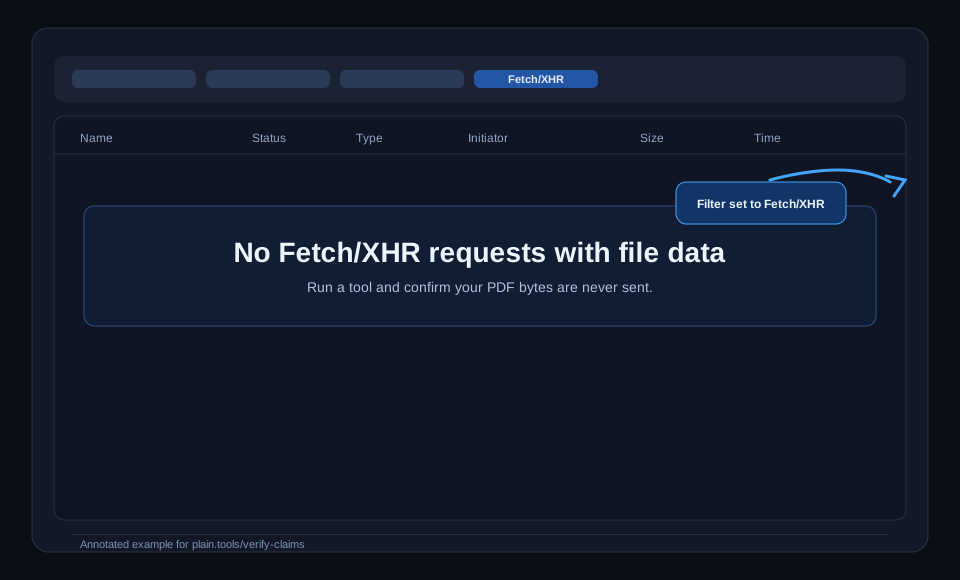
You can compare this against your own browser while processing a real document.
| Claim | How to verify |
|---|---|
| Files never leave your device | Open DevTools > Network and inspect requests while running a tool. |
| No ad-tech trackers | Open DevTools > Sources and Network. You should only see the Plausible privacy-first analytics script, not ad/retargeting trackers. |
| Works offline after load | Load the app, enable Airplane mode, then run a tool. |
| No accounts required for free local tools | Use core tools (merge/split/compress/redact) without registration or login. |
| No cookies required | Open DevTools > Application > Cookies and verify tool usage does not depend on cookies. |
Share text is prefilled with: “I just verified that Plain PDF tools genuinely don't upload my files. Here's how you can check too: plain.tools/verify-claims”
Want a deeper walkthrough? Use the full verification guide.
Open Technical WalkthroughThe quickest way to validate claims is to run a real task while watching Network requests. Start with one of these tools.
AI features are explicitly opt-in and may send extracted text for processing. Core local tools are the no-upload workflows verified on this page.